The setup guide
Relay ships a complete GTD® system, which is only useful if you know what to do with it. So we wrote the manual: 38 pages that teach the method from scratch and then show you exactly how it is wired into the app.
It is free, it is not gated behind an email address, and you do not need an account to read it. Download it, print it, send it to whoever you keep trying to explain this to.
PDF, 38 pages, 2.4 MB. No sign-up, no email address.
Written for two people
You have never read the book
Part One is a standalone primer: why holding commitments in your head fails, the five moves that replace it, a one-page map of the questions to ask about anything on your mind, and the weekly habit that keeps it all true. No jargon, no prerequisites, and no homework before you can start.
You know GTD, and you want to know if Relay does it properly
The rest of the guide is the answer, list by list: what each one holds, why items file themselves from the facts you record rather than by dragging, how the processing wizard maps onto the clarifying questions, and where Waiting For ends and Agenda begins.
It teaches the method, not the buttons
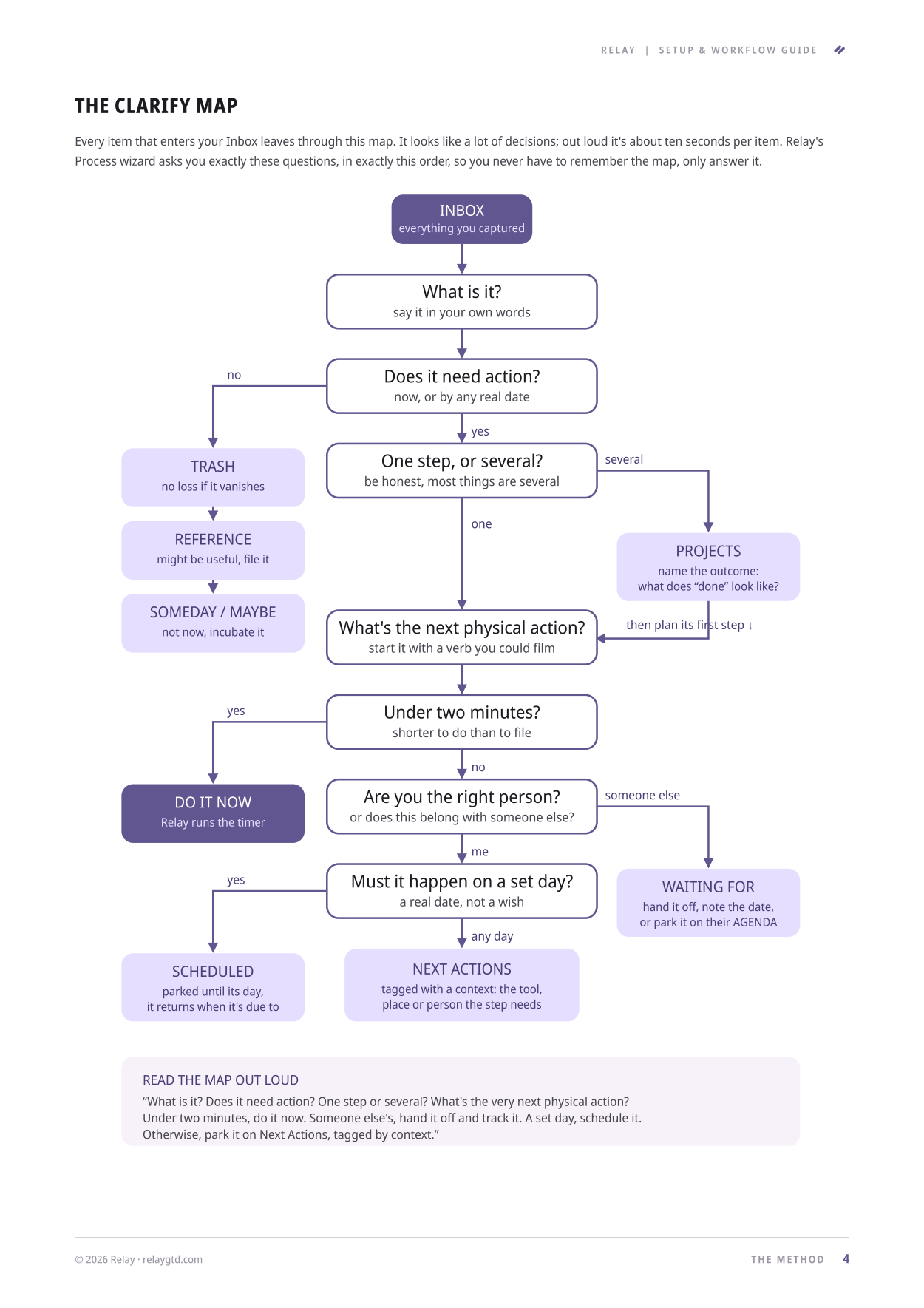
Most app documentation tells you where things are. This tells you what to do. It is the whole decision tree for turning anything you have captured into either a next action, a project with a defined outcome, something someone else owes you, or a decision to let it go.
Relay's processing wizard asks these exact questions in this exact order, so the map is not an analogy for the app. It is the app.
What is in it
The method
The five moves, the clarify map, and the weekly review checklist in three passes.
Every list
Inbox, Next Actions, Scheduled, Waiting For, Agenda, Someday/Maybe, Projects, Horizons and Reference, one page each.
Capture
Quick add, your private email address, the share sheet, home-screen widgets, the desktop hotkey and the watch folder.
The reviews
Both guided flows step by step, plus the mind sweep and how to make the weekly hour actually happen.
Email and calendar
Getting the other inbox to zero, and the three things that belong on a calendar and nothing else.
Your first week
A day-by-day on-ramp, and what to do on the week you inevitably fall off it.
The guide is our own work. It explains the Getting Things Done® method in our words, and reproduces nothing from the book or from the David Allen Company's own materials. If it does its job you will want the book too, and it says so.
Read it before you sign up. Or after.
30-day trial. Runs in your browser, no install needed.